

iPad and me
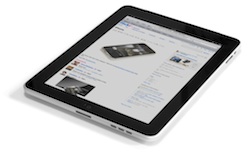 I’ve had my iPad since June 16th. I was in Boston; I had to rush over to the Apple Store on Boylston Street half an hour before they shut at 10pm, because they wouldn’t hold it for me any longer. And then I went and got drunk watching the Celtics at a sports bar, and almost lost my expensive new purchase, but that’s not important right now.
What’s important to me is that, in under a couple of months, I’ve come to use my iPad for more and more tasks. Is it a big iPod touch?. Sort of . Is it a limited device? Yes. But it doesn’t feel limiting, it feels liberating.
Mobile data costs: iPad 3G vs iPad with MiFi wireless hotspot
I recently looked at the cheapest options for mobile data for your iPad 3G.
But if you’re thinking of buying an iPad, you may not want to splash out the extra £100 for a 3G model instead of a Wifi-only model. However, what if you do need mobile broadband? Maybe that £100 is worth it?
So here’s a comparison between the prices of the different iPad models, with their differing mobile broadband options.
iPhone case giveaway winners
The iPhone case giveaway ended on Friday at midday, and here are the lucky winners!
I gave everyone who entered a number, and then did some clicking over at random.org to generate the winning entries. So, the winners are:
I’ll contact each of you in turn to see which case you’d like. If there are any cases that the winners don’t want, I’ll grab another random winner and let you know.
Thanks to everyone who entered. There will be another few case reviews and a giveaway in a little while 
What are the full iPhone unlocking policies of the UK networks?
I’ve already looked at how to buy the cheapest officially unlocked iPhone in the UK, but what if you already have your iPhone?
If you’ve decided you either can’t or don’t want to use an unofficial unlock, such as ultrasn0w from the iPhone Dev Team, then that leaves you with one option: get it unlocked officially by a mobile network.
So what’s the likelihood of that happening with the UK iPhone carriers? (more…)
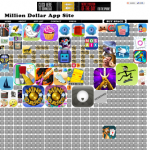
How to make a million from the App Store without writing an app
 There’s a clear policy on this website: no press releases. There are plenty of other sites that provide that sort of news regurgitation service. But on this occasion I’m going to break that rule.
I like to make people aware of iPhone-related things that are interesting, or just good ideas. And the best ideas are often the simplest, like this one.
iPhone case giveaway – Proporta, VOi Lorem and iWrap
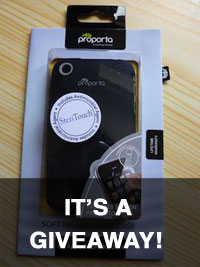
I’ve recently reviewed three different cases and covers for the iPhone:
Proporta’s Soft Feel silicon case
VOi’s Lorem hard shell case, and
iWrap’s protective film.
And now I’m going to give them away!
Review: iWrap cover for iPhone
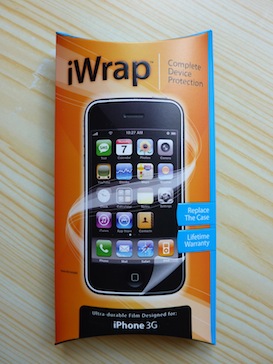 I’ve recently reviewed the Proporta Soft Feel Silicon Case and the VOi! Lorem. Lastly in this series of case reviews is the iWrap.
This is a totally different proposition – it’s not a case, it’s a plastic cover, but it goes over the whole phone. And you need to use adhesive to stick it on.
To be honest, I was a bit worried about what was going to happen to my iPhone when I took this review on.
Review: VOi! Lorem case for iPhone 3G and 3GS
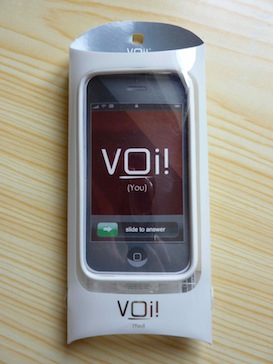 I’ve already reviewed the Proporta Soft Feel Silicon Case, and next up in my series of case reviews is the VOi! Lorem. I was quite impressed with the Proporta case, but this one is different – it’s a hard case with changeable front pieces.
Plus, it’s the only case Ive seen with an integrated lanyard in the back, to help you hold on to your iPhone.
Will it be enough tempt me away from the Proporta case?
Review: Proporta Soft Feel Silicon Case for iPhone 3G and 3GS
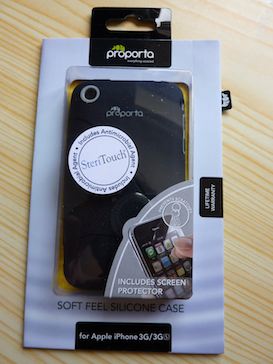 I have a few iPhone cases to review, and I’m going to kick off with one from Proporta. I’ve always had a silicon case for my iPhones, as I have a tendency to drop them. I’ve reviously been using a cheap silicon case for my iPhone 3G from Carphone Warehouse, which I reviewed in an earlier article.
That case was a bargain at a tenner, whereas Proporta’s Soft Feel Silicon Case for iPhone 3G and 3GS is five pounds more.
So how does the pricier case compare?