
I’m going to outline my thoughts on the rest of the enhancements to the 1.1.3 release of the firmware in my next post, but for now I’d like to skip to the feature I was most excited about since the news was leaked – upgraded Google Maps with a pseudo-GPS function.
A New Look
The Maps interface has changed, adding:
- a movable “drop pin” function to mark your own locations
- the hybrid map view, where maps are overlaid on satellite images. Having the Hybrid view makes Maps far better in my opinion – it makes route-finding much easier when you can actually see the buildings and landscape
- your current locations now becomes the start location when you switch to Directions, rather than blanking both start and end location (which was a little bugbear of mine)
But the big news in this Maps upgrade is the Location feature.
Location aka Pseudo-GPS
This feature is enabled using both cell triangulation on the iPhone and by looking up a list of wifi hotspots on the iPod Touch (provided by Skyhook Wireless). There are reports of this working well in London and mixed experiences elsewhere in the UK, but out here in the sticks (Reading) my experience is not good. Here’s my rundown so far:
- On the train, moving and with a partial signal (on GPRS & EDGE): Sketchy but working
- In Wiltshire, stationary once more and with a full signal (on GPRS): Again, sketchy but less so
- At home with a full signal (on Wifi): Not working It does work, and the results are shown below
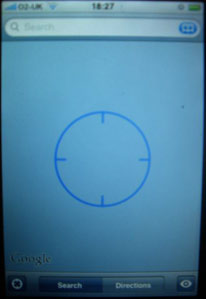
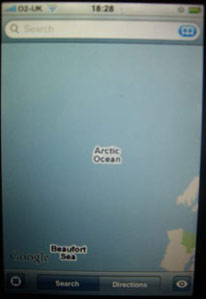
Yes, Google Maps firmly places me in the middle of the Arctic Ocean! If only I’d remembered my swimming trunks 
In my test areas to date, I’ve had least joy in fairly urbanised areas with good cell coverage, and it has worked best in sparsely populated rural areas. The Apple guided tour to the January iPhone update states that the iPhone includes location determining via Wifi in addition to cell triangulation. So I tried getting my location while on The Cloud but with my sim card removed, in a place where the iPhone could find my location when the sim card was inserted. Yep you guessed it, no joy 
Now some argue that consumers don’t really need GPS, they just need to know roughly where they are, and for that the far less accurate geolocation (as per the iPhone’s Location feature) is good enough. It may be true in Swindon – you can tell where you are owing to the grim looks and tracksuits – but in other locations pinpoint accuracy is indispensible.
I’ve used a friend’s touchscreen Windows Mobile phone connected to a bluetooth GPS, with the position overlaid on an OS map, to guide me round footpaths in rural Wales. The resolution of the GPS was fantastic, and I didn’t lose my way once. For a former Scout who still cannot properly read a map, it was a revelation that GPS could be so accurate and so usable, especially on a touchscreen where I could move the map with my finger. The Apple purist in me balked at the clunkiness of the Windows Mobile interface, but the practical hiker in me, the one who prefers not to strand his wife up mountains on wintry days, thought “this is fantastic!”
So Location in Google Maps may prove useful in some areas, but it’s no replacement for true GPS. I’m eagerly awaiting partfoundry’s GPS add-on or a new iPhone with GPS built in.
Maps doesn’t quite find UK addresses properly
This feature seems a bit inconsistent. Within Maps itself, searching on just a postcode, say “UB11 1BB” will find the location. However, tapping on the Address field in Contacts (where most people’s addresses will be stored) yields different results. When inputting a Contact on the iPhone, the country is automatically set as “United Kingdom”. Even entering just the postcode usually yields a match in Maps.
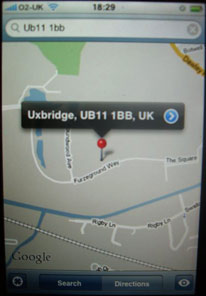
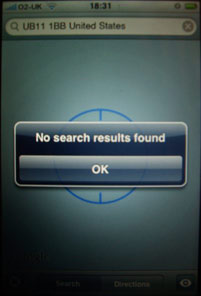
However, if you’ve input your contact’s address in Address Book on your Mac and not set the country to UK, then Maps will append “United States”. It will then try to search for “UB11 1BB United States” and fail to find a location. Unfortunately there is no option in Address Book or Applescript that I can find to change the country field en masse. I don’t know what the situation is like when syncing with Outlook on a Windows machine, so I would appreciate feedback in comments. This is a problem as many people will have migrated quite a few contacts over, and won’t want to sort them all out manually.
Surely a search where the country is not specified should default to the country based on the phone network, not just the US? Some localisation is needed here, as is better communication between Contacts and Google Maps. Alternatively Apple could add an option within Address Book to set the country for many contacts, or enable the user to choose their preferred default country within Google Maps, as they can on the desktop.
Live Traffic
The UK is getting the short end of the stick on live traffic information. As far as I can see we don’t get any, at least not in Berkshire, as the Show/Hide Traffic option makes no difference.
Overall
Maps is still one of the “Wow” factor items that people love when they see the iPhone (“You zoomed in right to my house!”), but I have to say I’m a little disappointed with the inconsistencies. I’m not knocking a free upgrade because some little annoyances have been eliminated, but I was expecting great things that haven’t quite been delivered.
Next: More on the rest of firmware 1.1.3’s enhancements, including why a sticky shift key should be something to shout about.