
 Ever since the App Store threw open its doors and waved in the general public to have a snoop around, I’ve been on something of a quest. This isn’t a quest for gold, the fountain of youth or a crystal skull. It isn’t even something I would expect to take long enough to be described as a quest. I simply want to find a ToDo app that works the way I want it to.
The usual method I (and, presumably, most others) use to choose apps is to wander around the App Store seeing what takes my fancy. “Oh look”, I might say, “an app to calculate the weight of all my socks. Just what I need.” Or, maybe “Ah, an app to synthetically replicate the expulsion of gastric exhaust – my life is complete.” But this is different. This time there is a very clear idea in my mind what the app should do and how it should do it.
It’s important you understand how picky I am on this. I’ve looked into the ‘Getting Things Done’ (GTD) technique and although it has it’s plus points, the fact is that it just doesn’t suit me. It seems overly complex and would be more trouble than it’s worth. I’d simply not tag each task with various location and context information. The fact that the majority of ToDo apps follow this technique in one form or another means they are of no use to me. Even if I could use a subset of the functions of a GTD app to implement my method, I’d find all the superfluous extras to be irritating. An app’s layout is important so any unnecessary buttons and screens couldn’t be tolerated.
Over the years I have developed my own simple way of doing things that suits me and the arrival of the iPhone OS provided an ideal platform for it. An iPhone app that would allow me to use this method would make my life that little bit better.
So, what exactly do I need it to do?
The three main functions are these:
1 – Be able to make several lists (or ‘projects’)
2 – Be able to add tasks to each of those lists
3 – Be able to move tasks very easily from one list to another
There’re other functions I would like but those are the fundamentals required to do things my way. Here’s why.
First, I’d set up the various lists (projects) I want. For example:
Project 1
Project 2
Project 3
Then I’d add the various tasks within those projects.
Project 1
…Task A
…Task B
Project 2
…Task C
Project 3
…Task D
…Task E
…Task F
Next, I’d add a special Project called ‘Do Today’.
Do Today
Project 1
…Task A
…Task B
Project 2
…Task C
Project 3
…Task D
…Task E
…Task F
This would allow me to go through the lists each evening, moving any tasks I want to get done next to the ‘Do Today’ list. The following morning, I’d have my list of tasks ready to tick off (or delete) as I go.
Do Today
…Task B
…Task C
…Task D
Project 1
…Task A
Project 2
Project 3
…Task E
…Task F
Sounds pretty simple doesn’t it? So simple, in fact, that surely any ToDo app or list maker would allow me to do it, right? Well, believe me, they don’t. Some come close but the place they usually fall down is the ‘Be able to move tasks very easily from one list to another’ part.
Try before you buy
I should tell you at this point that I made it a rule from day one of the App Store not to buy apps that I couldn’t try for free first. I’d say Apple should require developers to create free versions of their apps for users to try [Or perhaps allow a return period? – Matt]. Ok, I’ve lapsed a handful of times and bought a few apps without seeing them in action first (and regretted about half of those) but my principles stand mostly unsullied. So, it could well be the case that many apps already exist that do exactly what I want but if I have to pay for the privilege of finding out, I wouldn’t have tried them. Other than that, if it’s free and got a tick in its icon, I’ve almost certainly taken a look and rejected it.
As I mentioned, this search began as soon as the App Store opened and I’ve been able to keep on top of new apps relatively comfortably. As time has passed though, the apps started to appear at an increasing rate, making it difficult to keep up. If I was starting the search today, the prospect of wading through all the apps would be a daunting and off-putting one. As good as the App Store is, it’s certainly not faultless and tracking down an app that suits your particular needs is one such problem area.
A slight diversion into App Store Searching
At the moment, there are only a few, rather clumsy ways to narrow down a search of this type. To look for a ToDo app, for example, you might narrow it down to the Productivity category. Within the iPhone OS, you get 25 or so apps at a time with the ability to only show free ones and order them by release date. From that point you’re on your own, wading through thousands of similar apps. Clearly, that’s not of much help.
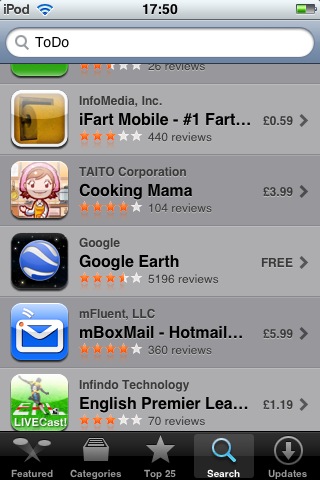 What about a search? Typing ‘ToDo’ in the iPhone App Store currently brings up, among a selection of relevant apps, Metal Gear Solid, SimCity, iFart Mobile, Google Earth, Space Invaders and so on. That, incidentally, is just within the top 25. Trying iTunes doesn’t really help much more. Although a search can be narrowed to apps rather than including music, podcasts and video, you’re left not really much better off than on the iPhone. So, search – more of a blunt instrument than a precision tool.
With the number of apps having now reached a level where finding the one that suits you best is largely impractical, Apple needs to think up new ways for users to get what they want. I have a couple of suggestions. The first is to expand the search ability to make it more useful. Adding boolean functions (find this AND that but NOT something else) would certainly help, assuming Apple could implement it in a user friendly way. The other suggestion is to expand the Genius recommendations to include apps. I don’t know what kind of black magic lies behind the Genius selections but it seems people are generally impressed with the results it produces. If it could be made to do the same with apps, not only might users find what suits them but lesser known app gems might get their chance to shine [This is something James Burland has suggested before – Matt].
Back to the plot…
As I mentioned, most of the ToDo apps I’ve tried follow the ‘Getting Things Done’ (GTD) philosophy and so, don’t suit me. In fact I’ve come to the conclusion that ToDo, list maker and organizer apps generally are very personal things. Trying to make your brain work a particular way that’s foreign to it just causes the gears to crunch and your concentration to be used up in the bureaucracy of task management rather than getting the actual thing done.
This meant I’ve had to use apps that, while good in their own right, didn’t work in a way that completely suited me. For a while I used ‘Zenbe Lists’ then, until recently, a nice little app called ‘CarbonFin Outliner’ which allowed me to make my lists and sub tasks very easily and back them up to the web. But they both lacked the vital ability to easily move a task from one list to another. The iPhone OS’s (current) inability to copy and paste, as awkward as it would be, didn’t even give me that option.
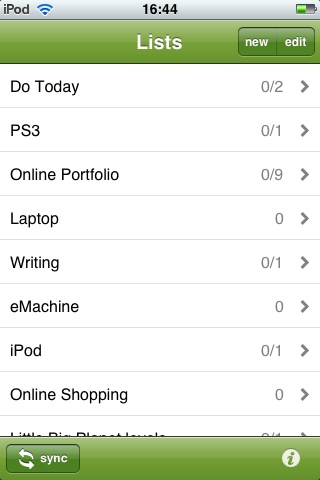
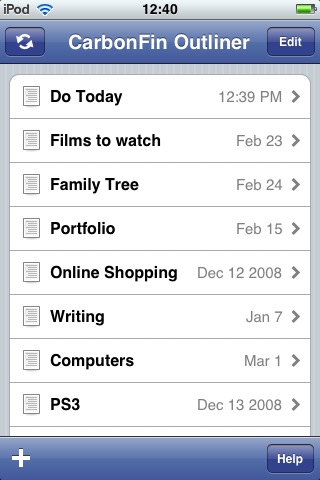
But wait. What’s this? Can it be? Surely not. Hang on, yes! Yes it is! An app that works the way I want it to!
Well… pretty much.
I guess it had to happen at some point or another if only due to the law of averages. Wade through enough apps and you’re bound to find one that fits the bill eventually, right? What is the name of this wondrous, long awaited piece of software? It’s…
Simplist
Not a great title but could one word have brought so much joy and relief to a man before? Well, possibly but let’s not go there. After using the fully featured, free (ad supported) version for about ten minutes, I realized that here was an app that included the minimum functionality I needed to put my method into practice. I bought the full version immediately.
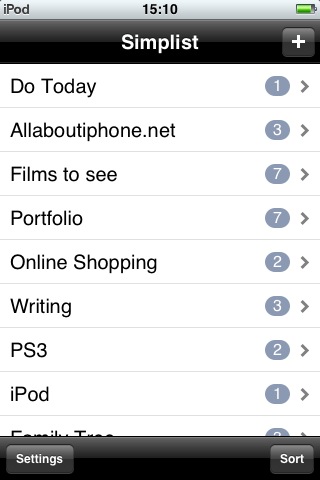
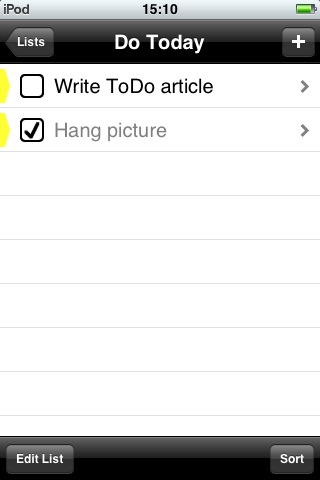
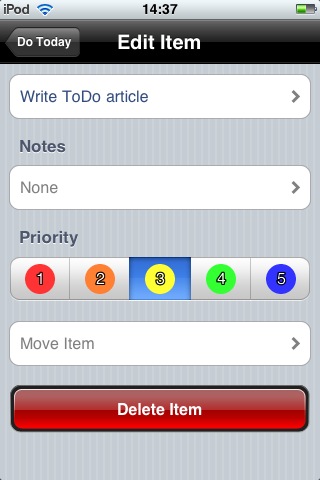
And there was a bonus. Simplist incorporated a feature I hadn’t thought of. I’m able to configure it in such a way that a red badge appears on the app’s icon showing how many items I have in my ‘Do Today’ list. This doesn’t sound much but I’ve found it to be a great motivation. 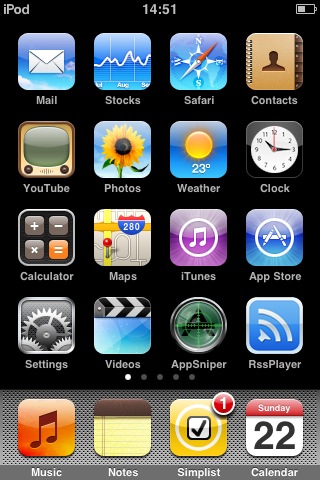 You’re desperate to complete the next thing so you can get that badge count down and there’s nothing more satisfying than ticking off the last task of the day and watching that badge disappear.
It’s only fair to point out Simplist also has other useful functions like priorities and being able to add notes to a task. It isn’t perfect though. The design looks a little basic and I’d like a smaller font so more items are visible on screen at once. I’m also not keen on the way priorities have a colour and how it’s used but these are all comparatively minor quibbles.
Never satisfied, me
So, am I happy now? Weeeelll… yes and no. On the one hand, I’m able at long last to put my ToDo method into practice using the iPhone OS. On the other, the closer an app comes to my ideal, the more pronounced the differences become. Ok, so I have the basics working but there are a number of secondary functions I’d love the app to include that would make the experience even better. For example, it’d be great if I could add a task and set a date for it. Then, when that day comes around, the app would automatically move the task into the ‘Do Today’ list allowing me to ‘set and forget’.
I’d also like to be able to link tasks to each other so they’d have predecessors and successors, project management style. The idea is that Task B could only be done once Task A has been completed. So, I’d create a ‘Buy a birthday card’ task and set a date of June 1st. Then I create a ‘Post birthday card’ task and select ‘Buy a birthday card’ as it’s predecessor. When June 1st comes around the ‘Buy a birthday card’ task is automatically moved to the ‘Do Today’ list. I buy a card and delete the task. Once it’s gone, its successor (‘Post birthday card’) is automatically moved to the ‘Do Today’ list and I know what I have to do next.
How about tasks whose priority increases over time? The idea is that even if a task is low priority when it’s added, the priority increases as it ages (up one ‘notch’ per week perhaps) so, eventually, it becomes high priority. At that point, it’s automatically moved to the ‘Do Today’ list. No more putting things off forever.
There’s only one thing for it
The author of Simplist seems very amenable to feedback and suggestions but there are limits to how far a developer can go to accommodate an individual user. So where does that leave me and my quest for the perfect ToDo app? I think it leads me to what was probably the inevitable conclusion from the start.
To get my ‘perfect’ ToDo app, one that does everything I want, the way I want then really the only way to get it is write it myself. I have a little programming experience but haven’t touched any serious code for years. On the other hand, my app shouldn’t require anything too tricky and Apple are at pains to pursued us that developing for the iPhone is a piece of cake. If I owned a Mac, I would certainly download the iPhone SDK and start playing around with it. Unfortunately, I don’t.
So that’s where I am. I have a fully specced ToDo app sitting in my head waiting to be pulled out but no outlet for it. Hey, Apple, got an old MacBook you don’t want?
Zenbe Lists
Version mentioned: V1.3
Category: Productivity
Company: Robert Kieffer
Current Price: £1.79
Works on: iPhone & iPod Touch

Outliner
Version mentioned: V1.5.0
Category: Productivity
Company: CarbonFin
Current Price: £1.79
Works on: iPhone & iPod Touch
Simplist
Version mentioned: V1.1
Category: Productivity
Company: LoftLab
Current Price: £0.59
Works on: iPhone & iPod Touch