
 For someone who spent the formative years of his youth reading maps in the Scouts, I have an unnerving ability to get lost. But so far – and this is especially inscrutable for a gadget freak – I have resisted the lure of satellite navigation. I just didn’t want to have to manage *yet another device* when a map and my innate sense of direction seemed generally adequate.
But a combination of my iPhone, an affordable satnav app called CoPilot Live, and a demand from the Significant Other to end unintended diversions – and I have an opportunity to see what this GPS driving business is all about.
So having ditched the maps for CoPilot Live, did my iPhone get me from A to B?
I was kindly given a copy of CoPilot Live v8 for the UK and Ireland, from ALK Technologies. It’s currently available on the App Store for £26.99.
FIRST USE
The first thing the app asks you to do is crate a CoPilot Live ID. I haven’t used this since and I’ve no idea what happened to the log in information, apart from an email to confirm. Apparently it’s for CoPilot Live services.
Using the iPhone as a satnav, I noticed that there’s no decent way to use it without a car mount; this is a problem that TomTom have sought to solve with their hideously expensive iPhone car kit. I first bought a Griffin Windowseat, a dedicated iPhone mount that claimed to stick on to the dashboard. But it kept falling over, so now I’m using a generic mount that clips to an air vent. The viewing angle’s not perfect, and it’s in portrait mode, but it’ll do.
Once the setup within the app is done, it’s on to getting some directions. The app launches ALK’s map and attempts to find your position via the iPhone’s GPS. It’s supposed to take up to 5 minutes, but every time I’ve used it, it has locked on within a couple of minutes at most. Sometimes that isn’t quick enough when I just need to drive off, so I’ve found myself making sure I launch the app as soon as I’m outside the house.
CHOOSING A DESTINATION
The app starts up with a choice of destination options.
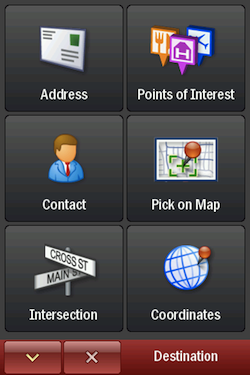
CoPilot Live destinations view
As you can see above, you can choose to route by:
- Address (manual input of an address)
- Point of Interest (of which there are several thousand)
- An address in your Address Book (very handy)
- Pick on Map (which is really fiddly)
- Intersection (which just seems to be another postcode chooser)
- Coordinates (For the truly precise: deg/min/seconds, decimal degrees, decimal minutes, OS Grid)
And you can also pick “My Places”:
- Home, Work, Recent, Favourites.
I find this option the handiest – often I’m out and about and don’t know the exact way home; once “Home” is set, it’s easy to quickly get routing.
YES, YES, BUT WHAT ABOUT THE ROUTING?
I’ve been using this app for a few months now, and I’ve found the routing is generally fine. I’ve specifically noted its performance on a these routes:
Route 1: A drive down from Berkshire to West Wittering on the south coast, a location completely unknown to me.
Route 2: Down to my mother-in-law’s from my house, a route I know very well.
Route 3: Up to Wolverhampton from Berkshire, a route I know roughly, but usually in need of a bit of help at the end.
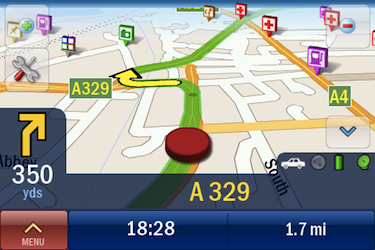
CoPilot Live, shown in 3D landscape mode
You can select the routing type from Quickest, Shortest, Avoid Motorways, or Economic
(Toll roads on/off). I’ve generally gone with quickest.
There’s an option to show a route overview, which I found good, but there’s a lot of panning and zooming to figure out exactly what that route is. If you have the time, there’s a demo mode, driving the route for you in advance. Thankfully you can fast forward this 
You can also use CoPilot to provide walking directions, but I haven’t tried that. At the moment I’m still wedded to Google Maps and figuring it out myself.
SO HOW DID COPILOT FARE?
Route 1: It felt like I was being led round the houses a bit. I had the occasional “You’re going in the wrong direction”, while I’d been driving down a straight road for miles. But I ignored the app’s protestations, and ploughed on through. It got us there.
Route 2: This is perhaps the trickiest for the satnav, because I have plenty of personal experience to compare it against. But CoPilot came out pretty well. It didn’t pick the route I know is most reliable, but reliability is not the same as a program choosing what it understands to the quickest or shortest route. But it did fairly well, getting us there within a few minutes of the time I would expect.
Route 3: This is a straightforward drive until the end, when we hit the long A454 from the motorway into Wolverhampton, at 4.30 on a Friday night. The ETA from CoPilot was incredibly optimistic, given that it’s a shocking road at the best of times. But that’s where Live Traffic would be very useful. I must mention the ClearLane view, which gives excellent guidance about which lane to take on major roads and motorways
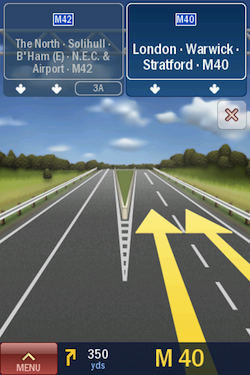
ClearLane view on the M40
One thing that made me wonder to begin with: If I missed a turn, the app wouldn’t say “You’ve missed a turn”, it would just silently re-route me. That was a bit freaky, as it seemed, no matter which way I went, I was always going in the right direction. At least I could say “I’m not going the wrong way” to my wife!
UPDATES TO THE APP
Since I started using CoPilot, it has received a few updates (the app will check for new versions when it starts, if you choose). I was given CoPilot at Version 8, and it’s now at Version 8.0.0.512; the versioning is consistent with their apps for other platforms.
One of the most important changes, in terms of the app’s usability, is the addition of a native iPhone keyboard. It was originally launched with an ABCDE keyboard layout, which I found to be a real pain when I used the app – having to mentally shift from the usual keyboard layout. It’s good that ALK has responded to user feedback, and the inclusion of the standard iPhone keyboard means I’ve become quicker using the app.
They’ve also added the ability to control the iPod app from within CoPilot. It’s not quite the same iPod interface, as you have a playlist internal to CoPilot that you add tracks to. But it does the job, and you can always double-click to get the built-in iPod controls.
And importantly, if you receive a phone call, it will return to the app afterwards and start navigation from the point at which you left it. In lieu of application mutii-tasking, that’s as good as it will get.
WHAT’S GOOD? WHAT’S BAD?
Well it always got me there, for starters. For someone who’s prone to inadvertent long detours, this was worth in it itself!
I really like the InfoBar at the bottom of the screen, with distance and ETA shown. You can customise this by tapping on it. Simple but informative, telling me how long my journey will last.
I had to switch CoPilot to always be oriented North with a 2D view, otherwise I found the constant turning of the map to be off-putting.
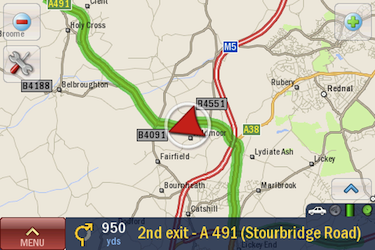
CoPilot Live, shown in landscape
You can determine certain preferences (routing type, etc.) by setting a Profile. However, when you start the app the next time, there’s no reminder of which Profile is set. This meant I was taken a very strange route one day, when I’d forgotten to switch from my “Strongly favour motorways” profile.
You can save and load saved routes, but I found the interface a bit clunky for doing so. I’d love to be able to use desktop software to choose and optimise the route, which is much easier on a large screen, then save those routes to the app. But there’s no import/export with CoPilot Central 2.0 (ALK’s desktop software) – it’s not compatible with the iPhone.
There are also no extra guidance voices to buy. Perhaps this could be added as an in-app purchase? I’ll be geekily honest here – I want Patrick Stewart giving me directions. ALK – Make It So.
OVERALL
It may be a bit *too* complicated. I’ve listed all the options available at the bottom of this article. The app seems incredibly well-featured, but a little complex for me. CoPilot Live almost feels like a device within a device, and I think I’ve barely used half its capabilities. There’s scope for a “Simple Mode” here I think. Just get me from A to B, as quickly as possible.
I’d say the biggest problem – and this isn’t a failure of CoPilot Live for iPhone – is that you’re tempted to fiddle with the satnav while driving. You can’t really use all this functionality and keep your full attention on the road. If you set things up correctly when you go and don’t run into any traffic, then it’s fine. But it helps to have a co-pilot to get the most out of CoPilot.
One thing ALK could do is bundle in a free month of Live Traffic, as Nokia do with some of their phones. Let people see what they are missing out on, and give them a comprehensive satnav experience to begin with. If I’d been given this option, I’d probably have ponied up the £20 annual for live services pretty easily.
I haven’t used any competing satnav apps or dedicated devices, so I’ve no real idea how CoPilot Live for iPhone stacks up against the competition. But I’m really pleased overall with the way it has performed. I haven’t bought the Live Traffic service yet – which is £20 a year – but I know I will at some point.
Thoroughly recommended.
CoPilot Live
Version reviewed: V8.0.0.512
Category: Navigation
Developer: ALK Technolgies, Ltd.
Current Price: £26.99
Works on: iPhone only

ALL THE APP OPTIONS
Here’s a listing of pretty much all the current options within CoPilot Live for iPhone:
Quick Stop
- Petrol Stn
- Restaurant
- Hotel
- Vehicle Repair
Detour
- Alternate Route
- Avoid Roads (lists all the roads on your route – you pick the one to avoid, and it gives you a different route to accept, with the associated extra time it will take)
Live Services
- Live Local Search
- Live Link
- Live Weather (local/at destination/somewhere else)
- Fuel Prices
- Roadside Assistance (calls the AA)
- Live Traffic
Driving Views
- 3D
- 2D
- Driver Safety
- Itinerary
- 2D Next Turn
- 2D Destination
- Day Map
- Night Map
Within the app’s Settings:
Routing Types
- Automobile, RV (presumably avoiding low bridges and country lanes), Motorcycle, Bicycle, Walking.
- Avoid ferries, Scenic route, Avoid/Allow/Warn on congestion zones.
Map Styles
- Different colours for both day and night maps
Map Display
- Heading Up, North Up, Show Turn Restrictions
Sound options
- GPS Status
- POI Display
- POI Alerts
- Safety Alerts
- Speed Limit
- (Voice) Guidance options
- Turn Warnings
- Driver Safety
- ClearTurn – for motorway signage
- Language options – Australian anyone?
- Day/Night mode
- Unit of Measurement
- Screen Orientation – use accelerometer as default, but can be set in portrait or landscape
- InfoBar
- Routing Profiles – choose vehicle type, motorways y/n, speed, dual carriageways, primary roads, secondary roads, local streets, toll roads
- GPS Track/Playback – to review your journeys
- Play Demo
- Licensing – allowing upgrades with the addition of a product key